Workflow graphs
orbit graph renders a workflow as a diagram: a Mermaid flowchart, a Graphviz (DOT) digraph, an SVG image, or a Mermaid sequence diagram of the calls the workflow makes. The diagram is drawn from the compiled definition, so it shows exactly what the runtime executes: implied dependencies, conditions, fan-out, retries, timeouts, compensations, outcome handlers and event handlers.
Usage
orbit graph workflows/order.orbit                      # Mermaid flowchart, to stdout
orbit graph workflows/order.orbit --format dot         # Graphviz DOT
orbit graph workflows/order.orbit --format svg -o order.svg
orbit graph workflows/order.orbit --sequence           # Mermaid sequence diagram
orbit graph workflows/fulfilment.orbit --workflow Shipping
| Argument or option | Default | Meaning |
|---|---|---|
<FILE> | required | A .orbit file or a compiled .json IR file. |
--workflow <NAME> | see below | The workflow to render, when the file defines several. |
--format <FORMAT> | mermaid | mermaid, dot or svg. |
--sequence | off | Render a Mermaid sequence diagram instead of the step graph. Only with --format mermaid. |
-o, --output <PATH> | stdout | Write to a file (parent directories are created) and print wrote <PATH> on stderr. |
Without --workflow, a file with one workflow renders that workflow, and a file with a parent workflow and its children renders the parent (the one workflow no other workflow in the file starts). Otherwise the command lists the workflows and asks you to choose:
$ orbit graph examples/fulfilment.orbit --workflow Nope
error: no workflow `Nope`; available: Shipping, Fulfilment
The file must compile; compilation errors are printed as with orbit check, and the command exits with status 1. --sequence with --format dot or svg is an error (status 1).
Deterministic output
The same definition always renders to the same text: steps appear in the IR’s execution order (a stable topological order), dependencies are sorted, handlers appear in the order failure, cancel, timeout, and event blocks are sorted by signal. You can commit the diagram next to the workflow and review changes to it as a diff. The first comment lines carry the workflow name, version and definition hash, so a stale diagram is visible in review.
What the graph shows
| Element | Mermaid | Graphviz | SVG |
|---|---|---|---|
| Step | rectangle id["..."] | rounded box | rounded box |
Step with a when condition | hexagon id{{"..."}} | shape=hexagon | box with an accent border |
Dependency (from after or from reading another step’s output) | a --> b | "a" -> "b" | curved arrow |
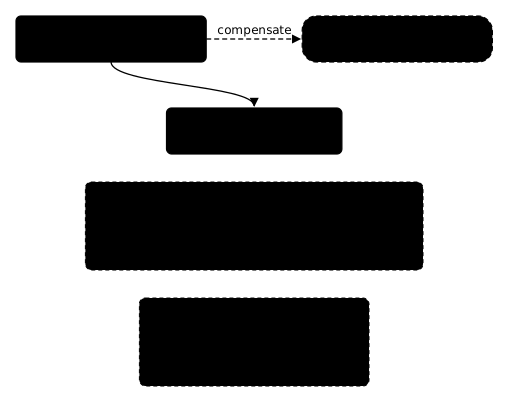
| Compensation | stadium <step>__undo(["undo <step>..."]) with class compensation, linked by <step> -. compensate .-> <step>__undo | dashed box, dashed edge labelled compensate | dashed box to the right of the step |
Signal feeding an await step | flag signal__<name>>"signal <name>"], dotted edge to the step | shape=cds, dashed edge | not drawn (the step label names the signal) |
on failure, on cancel, on timeout | subgraph on_<kind>["on <kind>"] | dashed cluster cluster_on_<kind> | labelled panel below the main graph |
on event <signal> | subgraph on_event_<signal>["on event <signal>"] | dashed cluster | labelled panel |
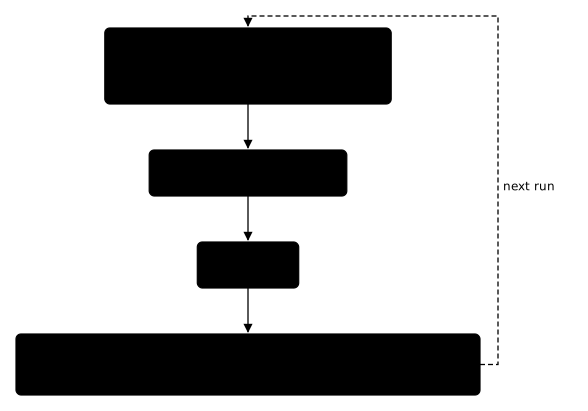
continue_as_new | subroutine continue_as_new[["continue as new..."]] after the final steps, and continue_as_new -. next run .-> <first step> | peripheries=2 box, dashed next run edge with constraint=false | box with a double accent border below the final steps, dashed next run edge up the right side into the first steps |
Node ids of handler and event steps are prefixed with the subgraph id (on_failure__tell_customer), so a handler step may share a name with a main step.
Each step’s label lists, one per line:
| Line | When present | Example |
|---|---|---|
| step name | always | charge |
| action | always | payments.charge@1.0.0 · python, child workflow Shipping, sleep 1h, await signal review, compute |
| fan-out | for steps | for each item (max 4 parallel) |
| condition | when | when analyze_risk.score < 0.8 |
| retry | more than one attempt | retry 5 attempts, exponential 500ms..10s |
| idempotency | idempotency_key | idempotency key |
| timeouts | timeout, queue_timeout, await ... timeout | timeout 30s, queue 5m |
Conditions are printed back as ORBIT expressions from the IR. Durations inside expressions appear as milliseconds, because the IR does not keep the unit. In Mermaid labels, <, >, " and # are written as the entities #lt;, #gt;, #quot; and #35;, which Mermaid renders as the characters.
The header comment also shows a workflow timeout and a limits block when present (%% workflow timeout 5m, %% limits max_history_events 5000).
Continue-as-new
A workflow with continue_as_new gets one more node. It follows the steps nothing depends on, because the condition is evaluated when every step has finished, and a dashed next run edge goes from it back to the steps without dependencies, where the next run starts. Its label has three lines: continue as new, the condition (when ..., or always without when), and the fields the next run’s input sets (next input { ... }, or the expression when the input is not an object literal). The node id continue_as_new is a keyword, so it never clashes with a step.
$ orbit graph examples/subscription.orbit
flowchart TD
    %% Subscription@1.0.0
    %% sha256:1d7a374edd1e400b4fb61a0d851ea74a99b4620006f6be5f06ce7a9421d6f8f1
    classDef compensation stroke-dasharray: 4 3
    classDef signal stroke-dasharray: 2 2
    charge["charge<br/><small>payments.charge@1.0.0</small><br/><small>retry 5 attempts, exponential 1m..1h</small><br/><small>idempotency key</small>"]
    receipt["receipt<br/><small>notifications.send@1.0.0</small>"]
    charge --> receipt
    next_period["next_period<br/><small>sleep 30d</small>"]
    receipt --> next_period
    continue_as_new[["continue as new<br/><small>when input.period #lt; input.periods</small><br/><small>next input { customer_id, amount, periods, period, charged }</small>"]]
    next_period --> continue_as_new
    continue_as_new -. next run .-> charge
$ orbit graph examples/subscription.orbit --format dot
digraph "Subscription" {
  // Subscription@1.0.0
  // sha256:1d7a374edd1e400b4fb61a0d851ea74a99b4620006f6be5f06ce7a9421d6f8f1
  rankdir=TB;
  node [shape=box, style=rounded, fontname="Helvetica", fontsize=11];
  edge [fontname="Helvetica", fontsize=10];
  "charge" [label="charge\npayments.charge@1.0.0\nretry 5 attempts, exponential 1m..1h\nidempotency key"];
  "receipt" [label="receipt\nnotifications.send@1.0.0"];
  "charge" -> "receipt";
  "next_period" [label="next_period\nsleep 30d"];
  "receipt" -> "next_period";
  "continue_as_new" [label="continue as new\nwhen input.period < input.periods\nnext input { customer_id, amount, periods, period, charged }", peripheries=2];
  "next_period" -> "continue_as_new";
  "continue_as_new" -> "charge" [style=dashed, constraint=false, label="next run"];
}
orbit graph examples/subscription.orbit --format svg:
In a sequence diagram (--sequence), the workflow sends itself a continue_as_new message after the main steps, inside opt when <condition> when there is a condition:
$ orbit graph examples/subscription.orbit --sequence
sequenceDiagram
    %% Subscription@1.0.0
    %% sha256:1d7a374edd1e400b4fb61a0d851ea74a99b4620006f6be5f06ce7a9421d6f8f1
    participant W as Subscription
    participant payments
    participant notifications
    W->>+payments: charge: payments.charge@1.0.0
    payments-->>-W: PaymentResult
    W->>+notifications: receipt: notifications.send@1.0.0
    notifications-->>-W: { delivered }
    Note over W: next_period: sleep 30d
    opt when input.period < input.periods
        W->>W: continue_as_new: next run with { customer_id, amount, periods, period, charged }
    end
The web UI draws the same node, coloured by whether a run continued.
Mermaid
A real diagram of examples/checkout.orbit:
$ orbit graph examples/checkout.orbit
flowchart TD
    %% Checkout@1.0.0
    %% sha256:8e0eda310a1bac4d68d8910cb6103264f436a98cc16535b7c5e95eac2a4a53c3
    classDef compensation stroke-dasharray: 4 3
    classDef signal stroke-dasharray: 2 2
    reserve["reserve<br/><small>inventory.reserve@1.0.0</small>"]
    reserve__undo(["undo reserve<br/><small>inventory.release@1.0.0</small>"]):::compensation
    reserve -. compensate .-> reserve__undo
    charge["charge<br/><small>payments.charge@1.0.0</small>"]
    reserve --> charge
    subgraph on_failure["on failure"]
        direction TB
        on_failure__tell_customer["tell_customer<br/><small>notifications.send@1.0.0</small>"]
        on_failure__summary["summary<br/><small>compute</small>"]
    end
    subgraph on_cancel["on cancel"]
        direction TB
        on_cancel__confirm_cancel["confirm_cancel<br/><small>notifications.send@1.0.0</small>"]
    end
This documentation is built without a Mermaid plugin, so the block above shows as source. GitHub and GitLab render mermaid code blocks in Markdown files, issues and pull requests. The same workflow rendered by orbit graph examples/checkout.orbit --format svg:
A workflow with conditions, retries and compensations (examples/order_processing.orbit):
flowchart TD
    %% OrderProcessing@1.0.0
    %% sha256:4fdfac082bf3f2fbbbc8ac5465d37cba01dffd1b8e4ae08e25be3e0d76486c41
    %% workflow timeout 5m
    classDef compensation stroke-dasharray: 4 3
    classDef signal stroke-dasharray: 2 2
    validate_order["validate_order<br/><small>orders.validate@1.0.0 · typescript</small><br/><small>timeout 10s</small>"]
    analyze_risk["analyze_risk<br/><small>risk.analyze@1.0.0 · python</small><br/><small>retry 3 attempts, exponential 1s..30s</small>"]
    reserve_inventory["reserve_inventory<br/><small>inventory.reserve@1.0.0 · typescript</small>"]
    validate_order --> reserve_inventory
    reserve_inventory__undo(["undo reserve_inventory<br/><small>inventory.release@1.0.0</small>"]):::compensation
    reserve_inventory -. compensate .-> reserve_inventory__undo
    process_payment{{"process_payment<br/><small>payments.charge@1.0.0 · python</small><br/><small>when analyze_risk.score #lt; 0.8</small><br/><small>retry 5 attempts, exponential 500ms..10s</small><br/><small>idempotency key</small><br/><small>timeout 30s</small>"}}
    analyze_risk --> process_payment
    reserve_inventory --> process_payment
    process_payment__undo(["undo process_payment<br/><small>payments.refund@1.0.0</small>"]):::compensation
    process_payment -. compensate .-> process_payment__undo
    send_notification["send_notification<br/><small>notifications.send@1.0.0 · typescript</small>"]
    process_payment --> send_notification
process_payment depends on analyze_risk because its condition reads analyze_risk.score, even though its after names only reserve_inventory.
A for step and a child workflow (examples/fulfilment.orbit):
$ orbit graph examples/fulfilment.orbit --workflow Fulfilment
flowchart TD
    %% Fulfilment@1.0.0
    %% sha256:ecffc60c3bd361d5112497749c532dc808cbe2db9f35af22c1ffee8f2f9d90d3
    classDef compensation stroke-dasharray: 4 3
    classDef signal stroke-dasharray: 2 2
    reserve["reserve<br/><small>inventory.reserve@1.0.0 · typescript</small><br/><small>for each item (max 4 parallel)</small>"]
    reserve__undo(["undo reserve<br/><small>inventory.release@1.0.0</small>"]):::compensation
    reserve -. compensate .-> reserve__undo
    ship["ship<br/><small>child workflow Shipping</small><br/><small>timeout 1h</small>"]
The child workflow is a single node. Render it separately with --workflow Shipping.
To produce an image from Mermaid source, use the Mermaid CLI:
orbit graph workflows/order.orbit -o order.mmd
npx -y @mermaid-js/mermaid-cli -i order.mmd -o order.svg
Graphviz
$ orbit graph examples/shipment.orbit --format dot
digraph "Shipment" {
  // Shipment@1.0.0
  // sha256:dc7d17291b8a4c9bcea44a73e12a8bbde9f20ec9d36f5447ea90d42882f4154d
  // limits max_history_events 5000
  rankdir=TB;
  node [shape=box, style=rounded, fontname="Helvetica", fontsize=11];
  edge [fontname="Helvetica", fontsize=10];
  "signal__delivered" [label="signal delivered", shape=cds, style=dashed];
  "arrival" [label="arrival\nawait signal delivered\ntimeout 30d"];
  "signal__delivered" -> "arrival" [style=dashed];
  "confirm" [label="confirm\nnotifications.send@1.0.0"];
  "arrival" -> "confirm";
  subgraph "cluster_on_event_location" {
    label="on event location";
    style=dashed;
    "on_event_location__text" [label="text\ncompute"];
    "on_event_location__tell" [label="tell\nnotifications.send@1.0.0"];
    "on_event_location__text" -> "on_event_location__tell";
  }
}
Render it with Graphviz:
orbit graph workflows/order.orbit --format dot | dot -Tsvg -o order.svg
orbit graph workflows/order.orbit --format dot | dot -Tpng -o order.png
SVG without external tools
--format svg lays the graph out itself and writes a standalone SVG document; neither Graphviz nor a browser is needed. The layout is simple and deterministic:
- each step is placed one layer below its deepest dependency (longest path from the steps without dependencies), and steps in a layer keep the execution order;
- a compensation is placed to the right of the step it undoes, on the same layer;
- each outcome handler and event block is laid out the same way in its own labelled panel, below the main graph;
- a
continue_as_newnode is placed one layer below the final steps; its dashednext runedges run up the right side of the graph and into the top of the first steps; - dependencies are curves from the bottom of a step to the top of its dependent. An edge that skips a layer can pass behind a node of the layer in between; use Graphviz for large graphs where that matters.
The SVG uses a monospace font, embeds its own stylesheet (colours follow prefers-color-scheme) and has a transparent background. orbit docs --format html embeds the same rendering in each workflow page.
Sequence diagrams
--sequence renders the calls a workflow makes as a Mermaid sequence diagram:
$ orbit graph examples/approval.orbit --sequence
sequenceDiagram
    %% OrderApproval@1.0.0
    %% sha256:939fd564b818da34796032e2c0086ce2f28118e2e9f31a6d9c1b21fdbfc57066
    participant W as OrderApproval
    participant Sender
    participant payments
    participant notifications
    Note over W: assess: compute
    opt when assess.needs_approval
        Sender->>W: decision: signal review (timeout 2d)
    end
    opt when !assess.needs_approval || coalesce(decision.approved, false)
        W->>+payments: charge: payments.charge@1.0.0
        payments-->>-W: PaymentResult
    end
    W->>+notifications: notify: notifications.send@1.0.0
    notifications-->>-W: { delivered }
    opt compensation, in reverse order, after a failure or cancellation
        W->>+payments: undo charge: payments.refund@1.0.0
        payments-->>-W: { refunded }
    end
| Element | Drawn as |
|---|---|
| Worker task | a call to a participant named after the task’s namespace (payments for payments.charge) and a reply with the contract’s output type (a record’s name, or its field names) |
| Child workflow | a call to the participant child_<Name> |
await | a message from the participant Sender |
sleep, compute | a note over the workflow |
when | an opt when <condition> block |
for | a loop for each <variable> block |
| Compensations | one opt compensation ... block at the end, in reverse execution order |
continue_as_new | a message W->>W: continue_as_new: next run with { ... } after the main steps, in an opt when <condition> block when it has one |
| Handlers and event blocks | one opt on <kind> or opt on event <signal> block each |
Steps appear in execution order. Steps that can run concurrently are drawn one after the other; the flowchart shows which steps are independent.
In VS Code
ORBIT: Show Step Graph (Mermaid) runs orbit graph on the current file and opens the Mermaid source beside the editor. See Editor support.
See also
- Documentation generation: the same diagram inside a reference page
- Dependencies
- Fan-out
- Child workflows
- CLI: orbit graph
- Editor support